The Oct. 7 water notice showed how quickly local instructions can change: a precautionary warning appeared in the evening, an update followed the next day and the all-clear arrived after repeat testing. Road closures and public-safety notices can move just as quickly.
No single alert service covers every Maricopa issue. Residents can close the biggest gaps by setting up three official sources: the City of Maricopa’s community alert network, Global Water’s customer and public-notice channels, and ADOT’s AZ511 traveler service.
Each system has a different job: city emergencies and disruptions, utility notices, and state-highway conditions. Graphic: OurMaricopa, based on the agencies’ official service pages.
1. City of Maricopa: MCAN and Genasys
The Maricopa Community Alert Network, or MCAN, is the city’s local notification system. The city says it uses the network for public-safety information, traffic disruptions and city announcements.
Registration is free. The city’s signup instructions route residents to a Genasys form, where users can add a name, address or subdivision and more than one phone number or email address. The form allows multiple communication methods so a household is not relying on a single device.
Use a current street address when the form asks for location information. Location can matter when an alert applies to a neighborhood, road segment or other defined area. Review the notification choices before submitting, and save the login or confirmation details needed to update the account later.
MCAN is the best of these three services for citywide emergency and municipal information. It is not a substitute for a water provider’s notice or a live state-highway report.
2. Global Water: customer contacts and the public-notice page
Global Water-Santa Cruz Water Company serves many Maricopa customers. During the Oct. 7–8 precautionary water event, the utility says it sent customer emails and alerts while also posting updates on its public-notice page.
Customers should keep their email address and phone number current with the utility and add customerservice@gwresources.com to their contacts or safe-sender list. Global Water’s contact page links customers to account services and lists 866-940-1102 for customer service and after-hours water or wastewater emergencies.
For an active water-quality event, the dated notice on the utility’s website is the first-party source. Check the timestamp: an initial precaution, a pending-test update and an all-clear can all remain visible in screenshots or reposts after the situation changes.
Global Water’s channels cover its own system and customers. Residents served by a different provider should use that provider’s official notification and emergency contacts.
3. ADOT AZ511: SR 347 and state-highway conditions
For SR 347, Interstate 10 and other state highways, use AZ511 or the official AZ511 mobile app. The Arizona Department of Transportation says the service provides incidents, delays, construction, closures and traffic-camera views.
Users can save routes and set alerts for the trips they make most often. For a Maricopa commuter, that can include the SR 347 corridor and connecting highway segments. A saved route is more useful than waiting for a general social post because it focuses the service on the roads that matter to that user.
AZ511 is a travel-information tool, not an emergency dispatch line. Never use a phone while driving; check the route before leaving or have a passenger use the service. Call 911 for an immediate emergency.
OurMaricopa’s SR 347 commuter guide collects official cameras and project links, while the The 347 page provides a local starting point. AZ511 remains the official source for current state-highway conditions.
A 10-minute setup checklist
Residents can complete the basic setup in one sitting:
Register for MCAN/Genasys with a current address, phone number and email.
Add a second contact method if the household has one.
Confirm that Global Water has current customer contact information, if it is your provider.
Bookmark Global Water’s public-notice page.
Install or bookmark AZ511 and save the SR 347 route used most often.
Keep 911 separate for immediate emergencies.
Then test the system from the user side: make sure confirmation messages arrive, check spam folders and update accounts whenever a phone number, email or home address changes.
These services cannot guarantee that every post, message or network transmission will arrive instantly. They do reduce dependence on screenshots, neighborhood reposts and word of mouth when a time-sensitive notice is changing.
Sources
City of Maricopa — “Emergency Notifications.” https://www.maricopa-az.gov/Departments/Communications-Cultural-Services/Emergency-Notifications. Accessed Oct. 10, 2026.
City of Maricopa — “Stay Informed and Connected with the Maricopa Community Alert Network.” https://www.maricopa-az.gov/Maricopa-eNews/Stay-Informed-and-Connected-with-the-Maricopa-Community-Alert-Network. Accessed Oct. 10, 2026.
Global Water Resources — “Public Notice.” https://www.gwresources.com/public-notice. Accessed Oct. 10, 2026.
Global Water Resources — customer-service and emergency contacts. https://www.gwresources.com/contact-old. Accessed Oct. 10, 2026.
Arizona Department of Transportation — “ADOT AZ511.” https://azdot.gov/resources/adot-az511. Accessed Oct. 10, 2026.
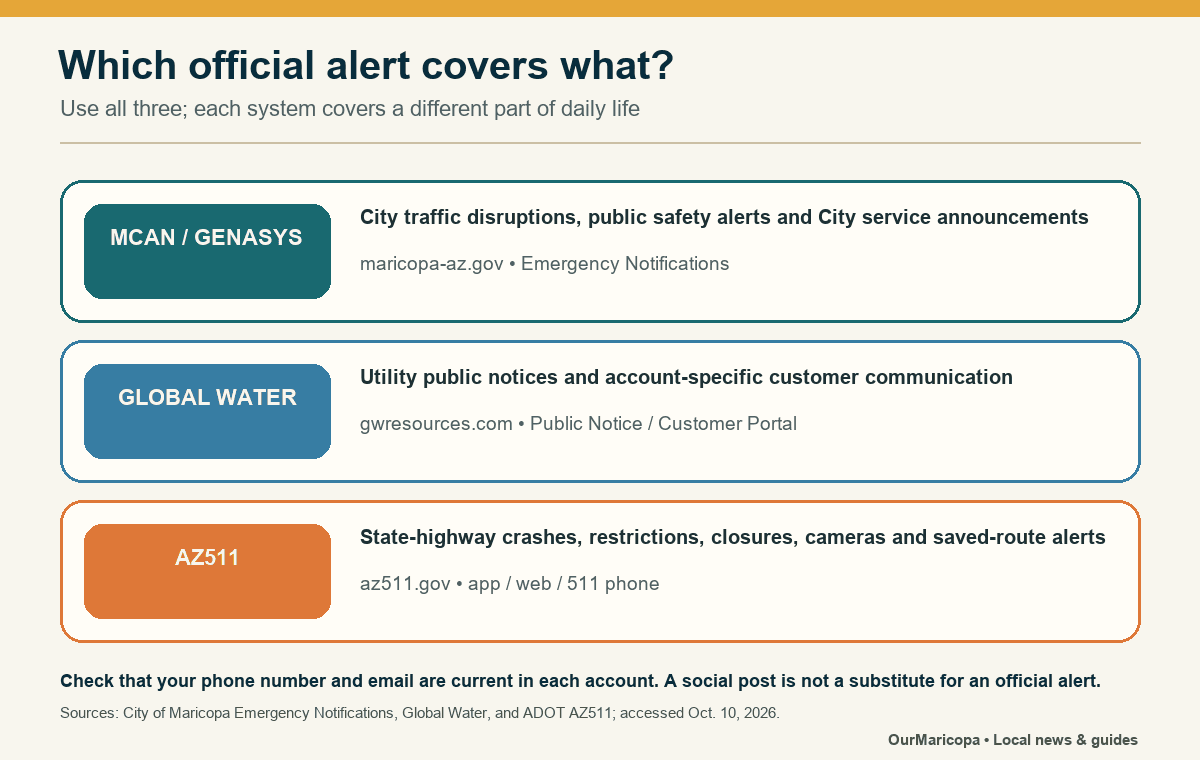
City, utility and highway alerts come from different systems; residents need all three for broader coverage. Photo: OurMaricopa graphic based on the agencies’ official service pages.